StreamPilot – One-Click Pixel Streaming for Unreal Engine
StreamPilot is a lightweight companion software for Unreal Engine that makes real-time Pixel Streaming setup effortless — no scripting or server headaches.
Software
Jun 27, 2025

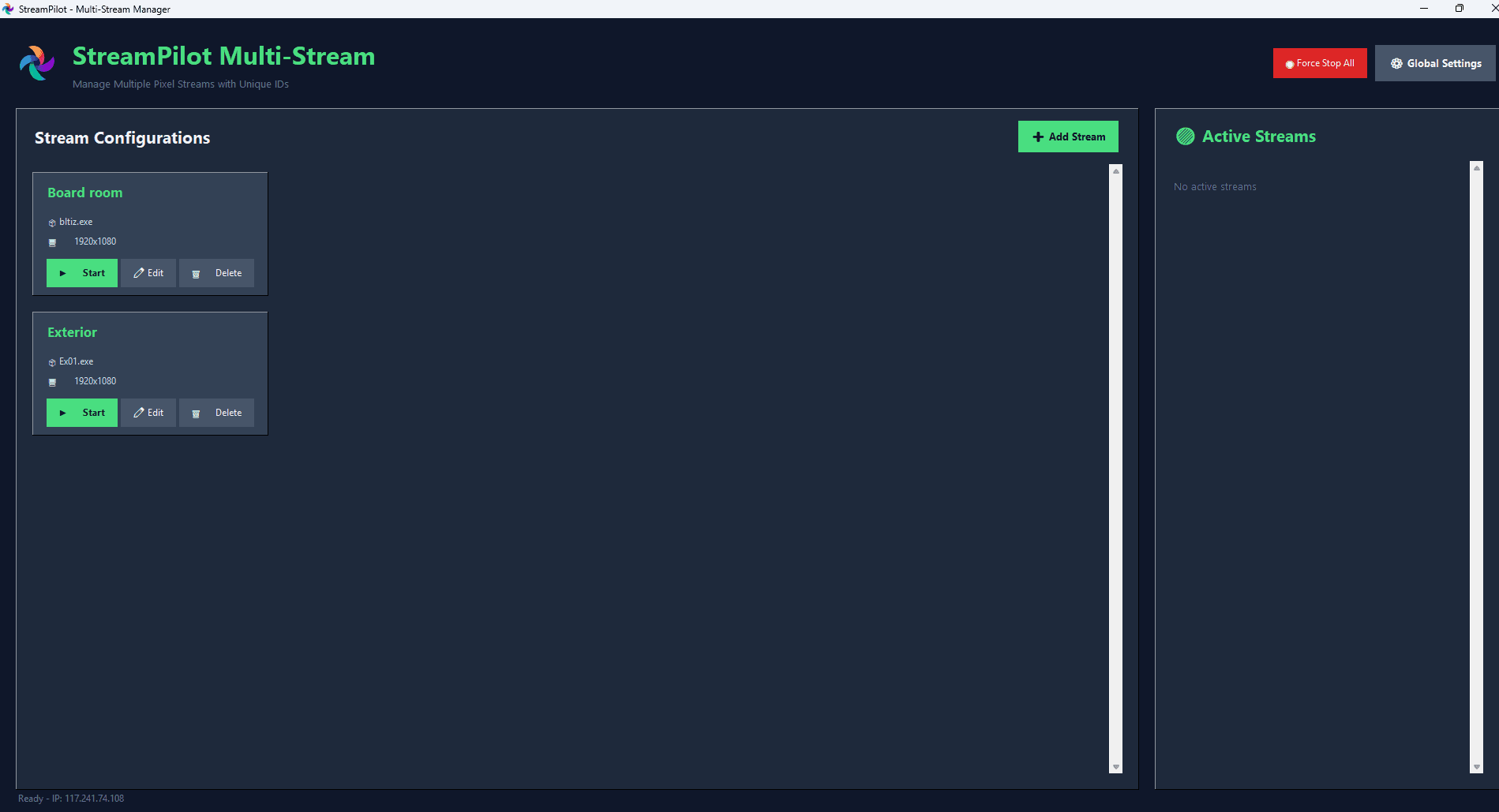
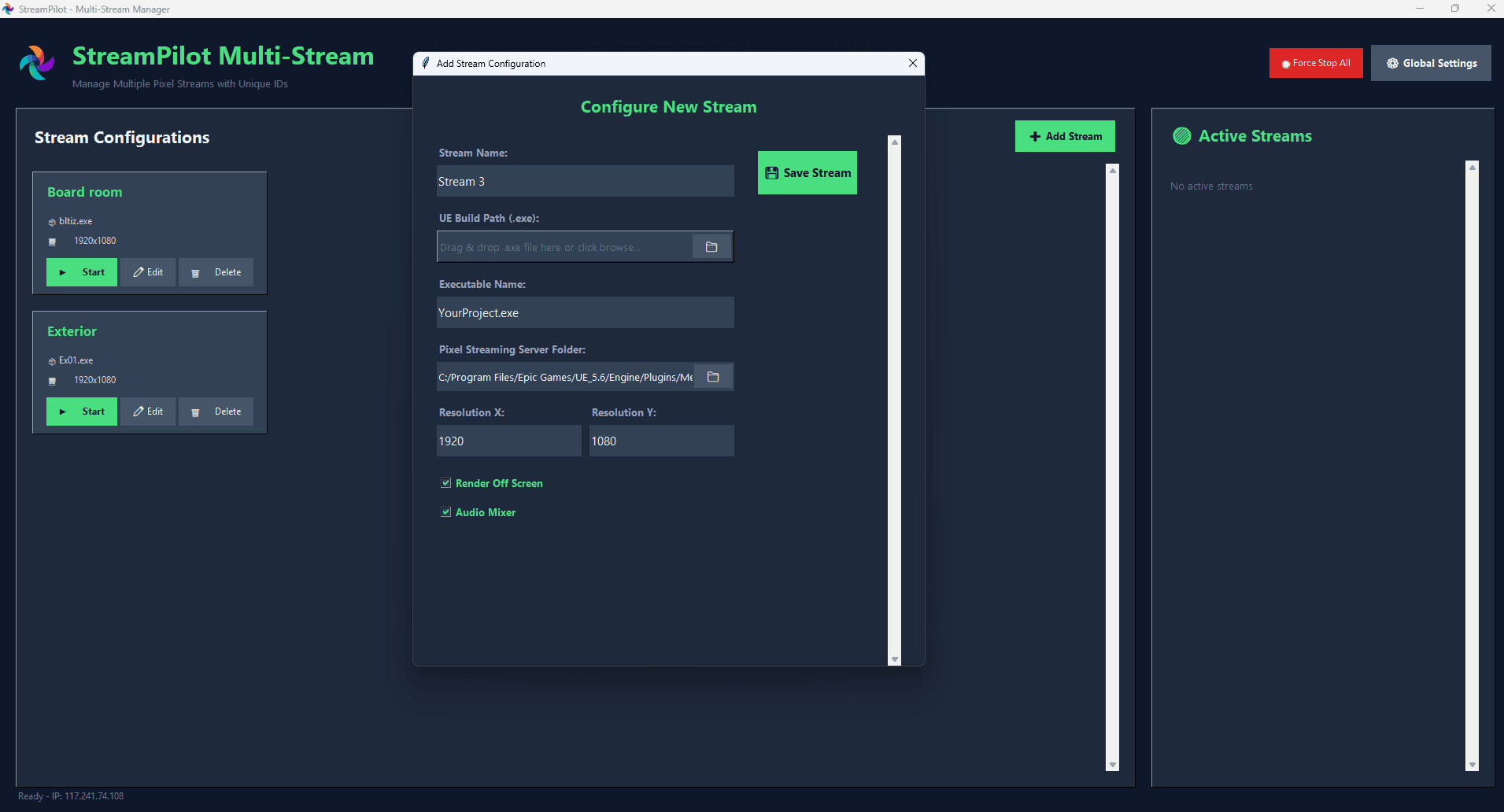
1. Drop or Load Your Unreal Build
Just select your
.exepackaged file and click Launch.StreamPilot will handle the signaling server, ports, and WebRTC connections behind the scenes.
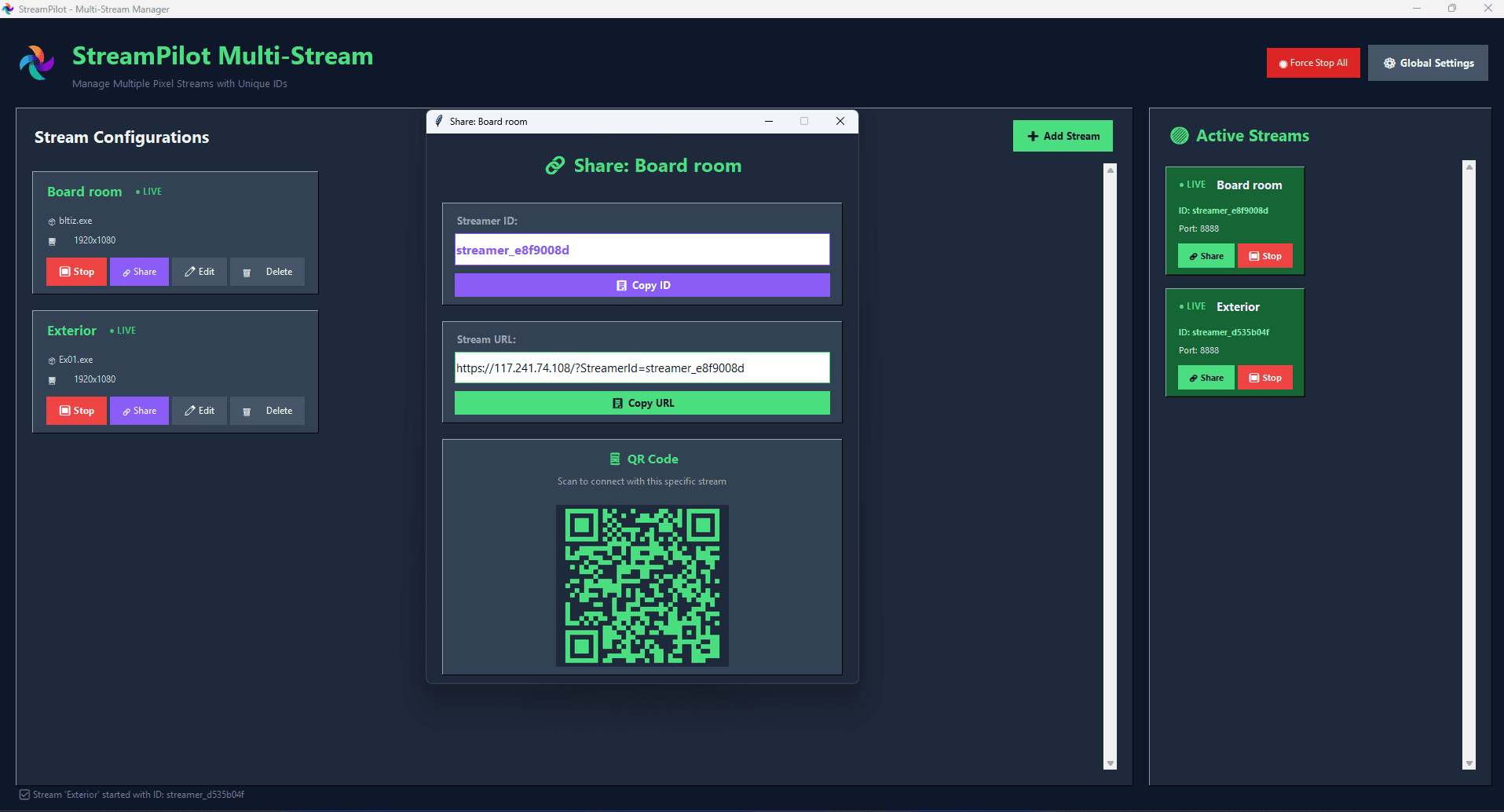
2. Choose Local, LAN, or Global Streaming
Stream to your local device, share across Wi-Fi, or even over the internet using Static IP.
Perfect for showcasing projects remotely to clients.
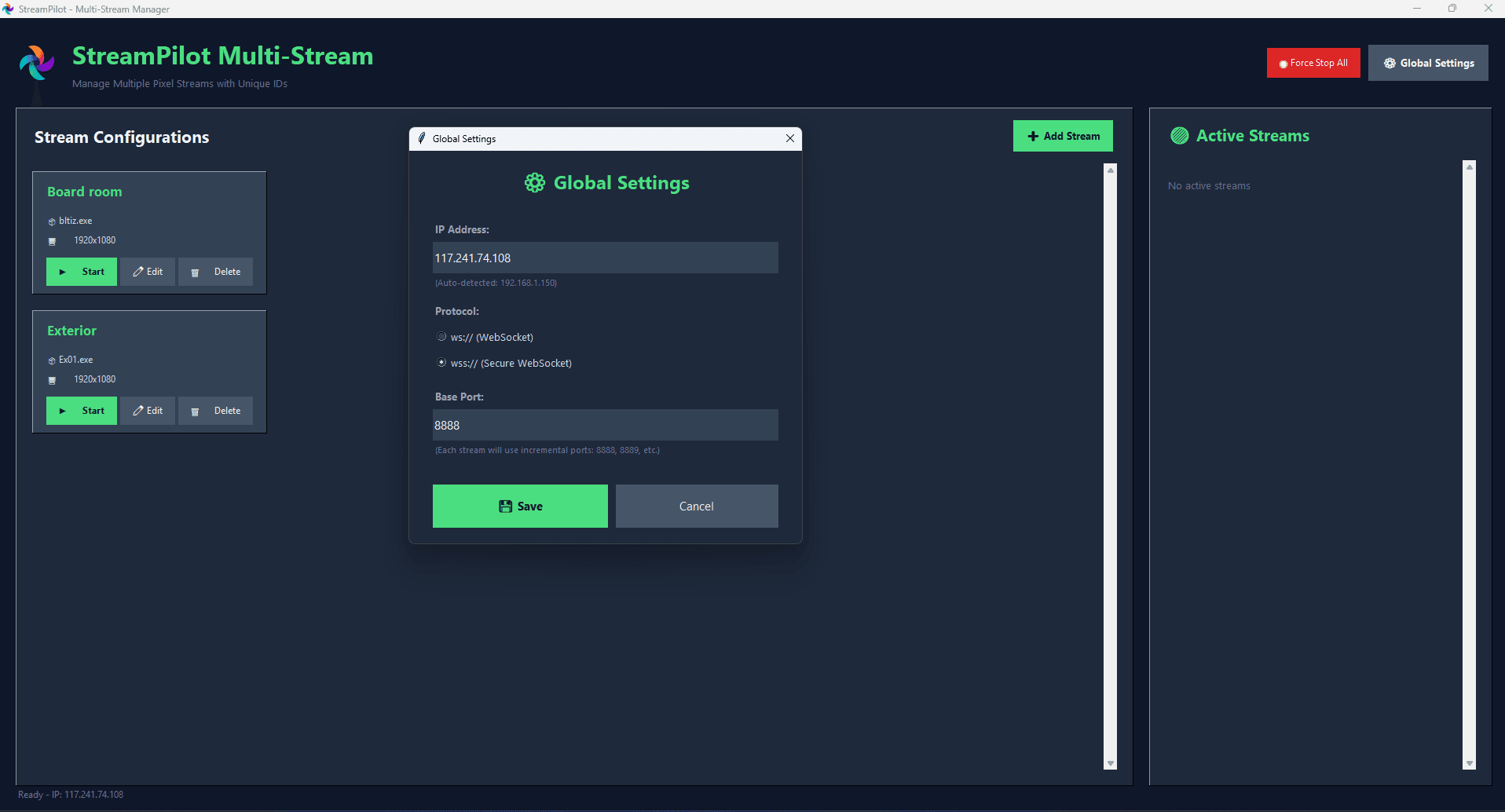
3. HTTPS / WSS Support Out-of-the-Box
Easily toggle between HTTP/WS and HTTPS/WSS for secure streaming.
Built-in SSL certificate config support.
4. Device Input Compatibility
StreamPilot supports touch, keyboard, and microphone input on all devices.
Ideal for tablets, mobile phones, laptops, and desktop PCs.
5. Why I Built StreamPilot
After developing multiple Unreal-based demos for clients, I found the Pixel Streaming setup process time-consuming and error-prone. So, I created StreamPilot — a fast, reliable way to share your UE project globally without writing a single line of code.
6. Smart Utilities for Artists
Quick tools like Gloss ↔ Roughness inversion and Height → Normal conversion make it easy to adapt maps for any rendering engine.
7. Real-Time Preview & Ready for Any Pipeline
Preview generated or split maps instantly in the UI. No more guessing how your maps will look — see results before exporting.
All exports are industry-standard, making them plug-and-play for Unreal Engine, Unity, Maya, Blender, or any PBR-supported software.

More to Discover

StreamPilot – One-Click Pixel Streaming for Unreal Engine
StreamPilot is a lightweight companion software for Unreal Engine that makes real-time Pixel Streaming setup effortless — no scripting or server headaches.
Software
Jun 27, 2025
1. Drop or Load Your Unreal Build
Just select your
.exepackaged file and click Launch.StreamPilot will handle the signaling server, ports, and WebRTC connections behind the scenes.
2. Choose Local, LAN, or Global Streaming
Stream to your local device, share across Wi-Fi, or even over the internet using Static IP.
Perfect for showcasing projects remotely to clients.
3. HTTPS / WSS Support Out-of-the-Box
Easily toggle between HTTP/WS and HTTPS/WSS for secure streaming.
Built-in SSL certificate config support.
4. Device Input Compatibility
StreamPilot supports touch, keyboard, and microphone input on all devices.
Ideal for tablets, mobile phones, laptops, and desktop PCs.
5. Why I Built StreamPilot
After developing multiple Unreal-based demos for clients, I found the Pixel Streaming setup process time-consuming and error-prone. So, I created StreamPilot — a fast, reliable way to share your UE project globally without writing a single line of code.
6. Smart Utilities for Artists
Quick tools like Gloss ↔ Roughness inversion and Height → Normal conversion make it easy to adapt maps for any rendering engine.
7. Real-Time Preview & Ready for Any Pipeline
Preview generated or split maps instantly in the UI. No more guessing how your maps will look — see results before exporting.
All exports are industry-standard, making them plug-and-play for Unreal Engine, Unity, Maya, Blender, or any PBR-supported software.
More to Discover
StreamPilot – One-Click Pixel Streaming for Unreal Engine
StreamPilot is a lightweight companion software for Unreal Engine that makes real-time Pixel Streaming setup effortless — no scripting or server headaches.
Software
Jun 27, 2025
1. Drop or Load Your Unreal Build
Just select your
.exepackaged file and click Launch.StreamPilot will handle the signaling server, ports, and WebRTC connections behind the scenes.
2. Choose Local, LAN, or Global Streaming
Stream to your local device, share across Wi-Fi, or even over the internet using Static IP.
Perfect for showcasing projects remotely to clients.
3. HTTPS / WSS Support Out-of-the-Box
Easily toggle between HTTP/WS and HTTPS/WSS for secure streaming.
Built-in SSL certificate config support.
4. Device Input Compatibility
StreamPilot supports touch, keyboard, and microphone input on all devices.
Ideal for tablets, mobile phones, laptops, and desktop PCs.
5. Why I Built StreamPilot
After developing multiple Unreal-based demos for clients, I found the Pixel Streaming setup process time-consuming and error-prone. So, I created StreamPilot — a fast, reliable way to share your UE project globally without writing a single line of code.
6. Smart Utilities for Artists
Quick tools like Gloss ↔ Roughness inversion and Height → Normal conversion make it easy to adapt maps for any rendering engine.
7. Real-Time Preview & Ready for Any Pipeline
Preview generated or split maps instantly in the UI. No more guessing how your maps will look — see results before exporting.
All exports are industry-standard, making them plug-and-play for Unreal Engine, Unity, Maya, Blender, or any PBR-supported software.